
How to Improve Website Speed for Better SEO Rankings
Introduction
The speed of the site becomes one of the main aspects, which can influence the users’ experience and positioning in the search engine. Since the online world operates fast, the users tend to expect that your website will be fast enough. The slower your site, the more likely it is that your potential customer or viewer would simply quit from using your service or reading your materials.
If you seek to improve the SEO efficiency of your website, the website speed should become one of your first priorities. The higher speed will contribute to better user experience and higher conversion rate. It will make crawling and indexing easier for the search engines.
Here are several tips, which can help you understand website speed and its optimization.
Why Website Speed Matters
The speed of your website is not only a technical thing; rather, it affects your visitors’ interactions with the website.
Slow websites cause issues like:
Bounce rate increase
Search engine ranking reduction
User experience decrease
Decrease in conversions
Customer trust decrease
Online sales reduction
Google evaluates websites on the basis of page experience and Core Web Vitals. Fast websites are more likely to give good user experience and hence rank well in the search engine results.
How Website Speed Affects SEO
The role of a search engine is to offer its users the best experience. Slow web pages lead to an uncomfortable experience; that’s why page speed has become a crucial ranking factor.
Website speed optimization benefits include:
Increased organic traffic
Search engine visibility improvement
Decreased bounce rate
Increased average session duration
Improved mobile performance
SEO performance improvement
For those wondering how to improve SEO performance, website speed optimization is among the most efficient approaches.
Common Reasons Why Websites Become Slow
Understanding why websites underperform is the starting point of optimizing them.
Image Files That Are Too Large: Large image files without compression lead to an increase in page loading time.
Poor Website Hosting: Sub-standard hosting cannot cope well with handling website traffic.
Unnecessary Plugins: Installing plugins that you do not need makes your website slower.
JavaScript and CSS Files That Are Too Large: Big script and style files take extra time to load before being functional.
Absence of Browser Caching: If browser caching is missing, browsers have to download website resources each time someone visits your site.
Too Many Redirects: Excess redirects cause more server requests and hence slow down page load time.
Best Ways to Improve Website Speed
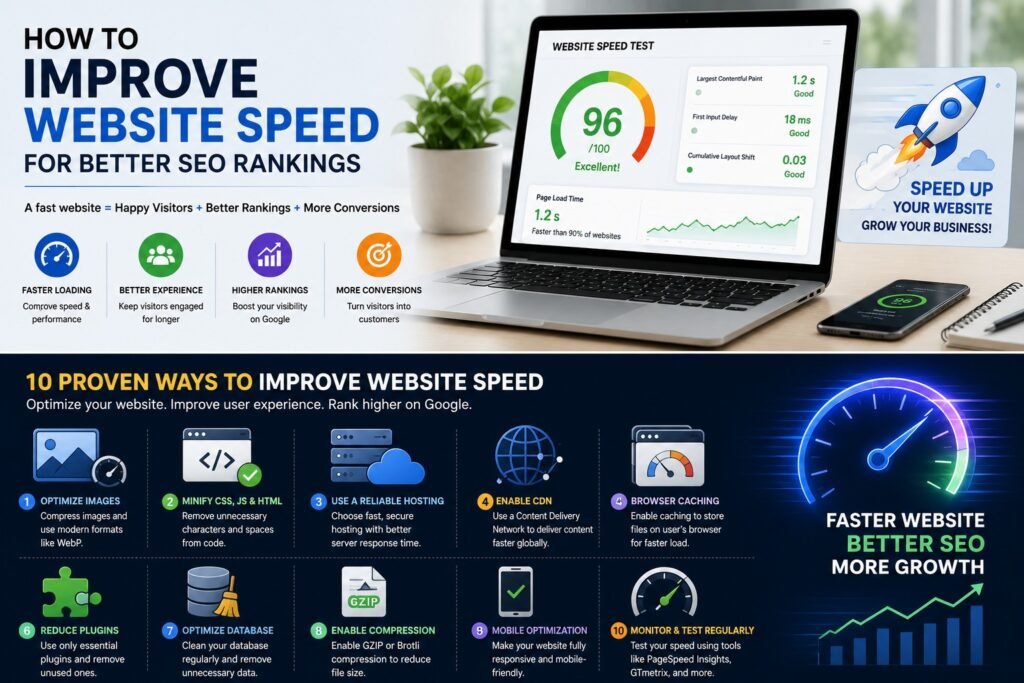
1. Compress Images
In most cases, images constitute the bulk of a website’s size.
Use modern image formats such as:
WebP
AVIF
JPEG
Make sure to always resize images before uploading them on your website.
2. Enable Browser Caching
With caching, browsers can cache website resources so that returning visitors do not have to download everything again.
Advantages include:
Faster loading
Low server load
Improved user experience
3. Minify CSS, JavaScript, and HTML
Minification involves removing unnecessary spaces, comments, and characters from your code while retaining functionality.
Advantages include:
Small file sizes
Fast downloads
Faster page speed
4. Get Quality Web Hosting
The web hosting service you choose affects website speed greatly.
Seek out a hosting provider that provides:
SSD or NVMe hosting
LiteSpeed or NGINX servers
Free CDN
High uptime
Fast server response times
Quality hosting increases website speed and SEO.
5. Use a Content Delivery Network (CDN)
A CDN hosts duplicates of your website on several global servers. When users access your website, content is served up from the closest server.
Advantages include:
Faster global performance
Improved security
Lower server load
Step 6: Reduce the Count of Plugins
When you install a plugin, the amount of code increases and the server gets flooded with requests. Your site should have plugins that are necessary.
Eliminate regularly:
Plugins that are unused
Plugins that are not updated
Plugins that are duplicates
Step 7: Optimize Your Website Database
The website database contains unnecessary things like revisions or spam comments. The optimization helps to increase the performance of the website.
Step 8: Activate GZIP/Brotli Compression
Gzip compression reduces the size of your website files.
The advantage of this method includes:
Faster file download
Reduced bandwidth costs
Faster loading time
Step 9: Optimize Core Web Vitals
Core web vitals are the parameters introduced by Google.
Three main parameters are:
LCP
INP
CLS
Improved core web vitals will assist with seo performance of your site.
Step 10: Adapt Website for Mobile Users
A bulk of all users use mobile phones for web surfing.
Thus your website should be:
Able to adapt to all mobile devices
Quickly load
Have images well-compressed
Have readable fonts
Be easy to navigate
Tools to Test Website Speed
Several tools for free can be used to test website performance.
Examples include:
Google PageSpeed Insights
GTmetrix
Pingdom Website Speed Test
Lighthouse
WebPageTest
These will point out any problems and give advice on how to improve them.
Additional Ways to Improve SEO Performance
Apart from improving website speed, one should also:
Write quality content.
Optimize title and description tags.
Create internal links.
Improve website security with HTTPS.
Use structured data.
Remove broken links.
Optimize images by adding alt text.
Create XML sitemap.
Make website navigation convenient for visitors.
Using all the above tips in combination with fast website will significantly boost search engine rankings.
Mistakes to Avoid
Website owners tend to make certain mistakes that reduce their website performance without realizing it.
Do not:
Upload large-size images
Use lots of animations
Install unnecessary plugins
Fail to update the software
Choose cheap web-hosting without performance optimization
Use non-optimized heavy themes
Forget to test the speed on mobile devices
Small improvements in these aspects will yield positive results.
Conclusion
The speed at which the web page loads is not an optional factor anymore, but an essential component in today’s SEO strategies. The faster the website loads, the more enjoyable the user experience will be, and the higher the engagement level as well as search engine ranking.
If your aim is to learn how to optimize the SEO performance, then website speed optimization must become one of the priorities for you. Website speed optimization can be accomplished via image compression, website hosting selection, cache activation, plugins reduction, and Core Web Vitals performance improvement.
SEO is an ongoing process, and website speed optimization is one of the most valuable investments you can make in this sphere. The fast website will bring in more visitors, who will later become your loyal customers.